Business Problem
IDSentinel Solutions deployed an internal AI assistant to automate identity reporting tasks — user profile lookups, group membership queries, and access summary generation. The assistant was initially granted broad delegated permissions using an admin account token stored as an environment variable. There was no audit trail of what the agent called, no mechanism to scope its access to the minimum required, and no decommission procedure if the agent needed to be retired or compromised.
The security team flagged this as a governance gap: an autonomous agent with broad API access and no identity controls is indistinguishable from a compromised service account. SOC 2 CC6.1 requires logical access controls for all access to organization data — the existing deployment had none.
Risk
- Overprivileged agent — admin-scoped token granted access to all Graph API resources, far beyond what the agent required to perform its function
- No audit trail — API calls made by the agent were not distinguishable in logs from human admin activity; attribution to the agent was impossible
- Static credential exposure — access token stored as environment variable, extractable from the host and rotated only manually on a best-effort basis
- No decommission path — no process existed to revoke agent access on retirement, compromise, or ownership change
- SOC 2 exposure — CC6.1, CC6.3, and CC6.8 controls could not be evidenced for AI-driven API access under the existing deployment model
Scope
| Field | Detail |
|---|---|
| Agent identity | Entra ID app registration — IDS-AIAgent-GraphReporter |
| Auth flow | OAuth2 client credentials (application identity, no delegated user context) |
| API permissions | Four scoped Graph API application permissions with documented justification and explicit denial of all others |
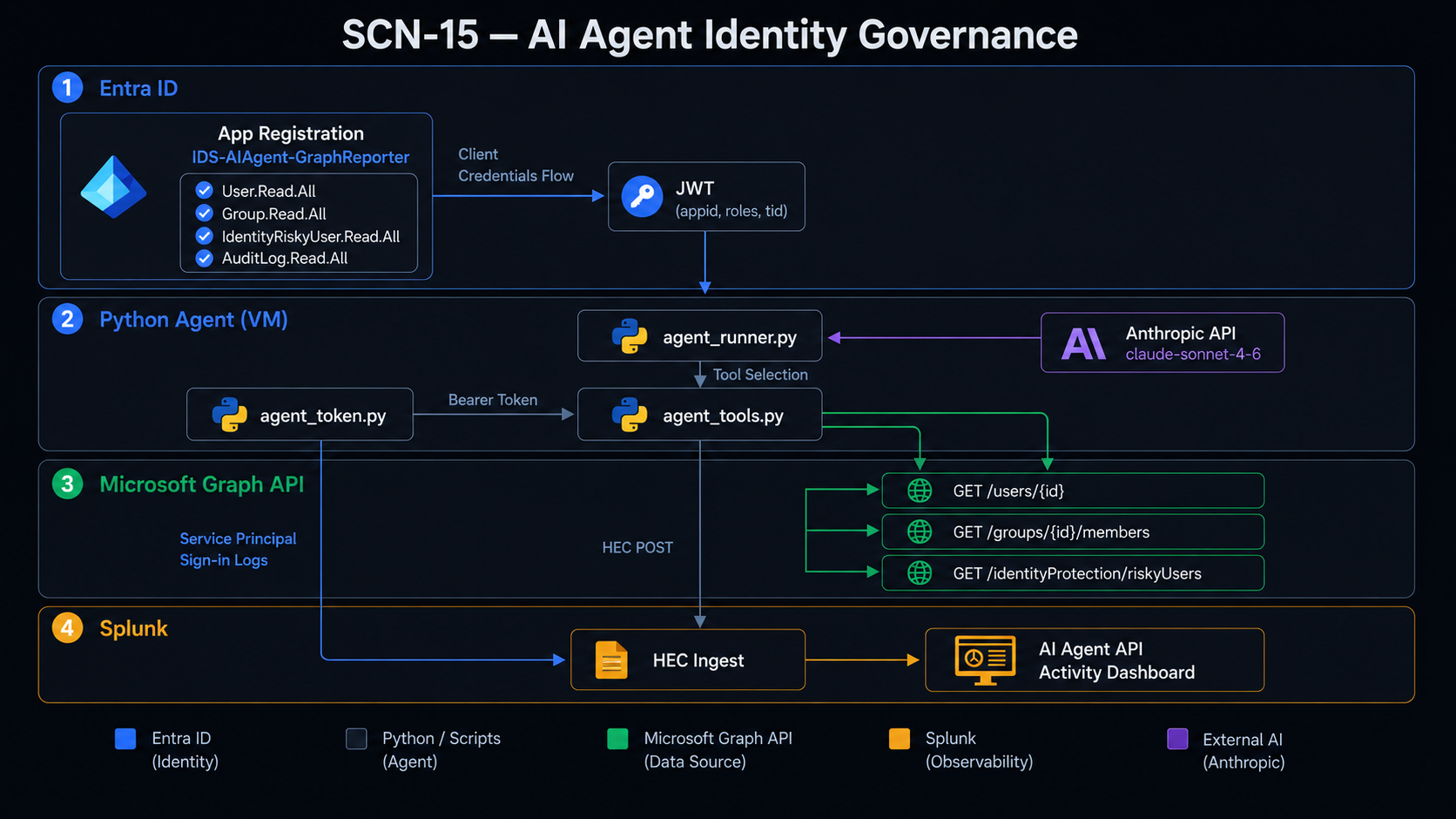
| Agent implementation | Python agent using Anthropic API for tool selection, governed bearer token for Graph API execution |
| Audit pipeline | Splunk HEC log ingest + Entra service principal sign-in logs — agent API activity surfaced in dedicated dashboard |
| Decommission | Secret revocation, app registration disable, 401 confirmation, sign-in log evidence — full sequence validated in lab |
| Compliance target | SOC 2 Type II — CC6.1, CC6.3, CC6.6, CC6.8 |
Solution Design — 5 Phases
App Registration and Permission Scoping
Register IDS-AIAgent-GraphReporter in Entra ID with four application permissions. Document justification for every permission granted and denial rationale for every permission not granted. Generate a client secret with 90-day expiration tracked in Bitwarden.
OAuth2 Token Acquisition and JWT Validation
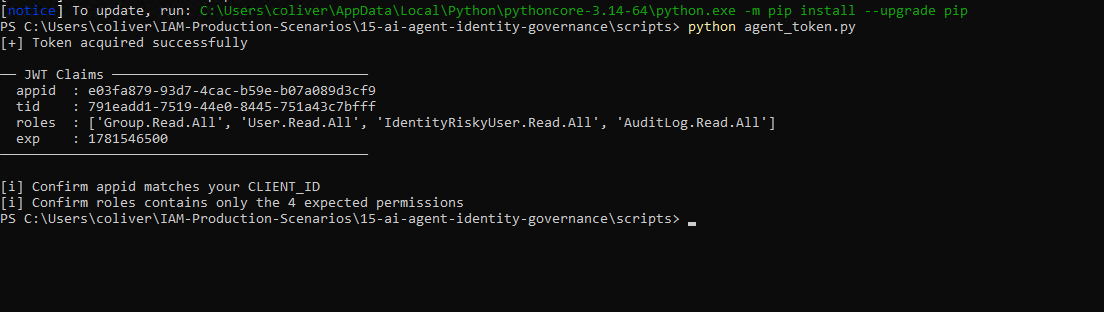
Implement client credentials token acquisition in Python. Decode the JWT and confirm appid, roles, and tid claims match expectations. Document the break/fix on the /.default scope omission.
Agent Tool Implementation
Three tool functions using the governed bearer token. Anthropic API receives a natural language prompt, returns a structured tool selection, agent executes with the governed token. Token not held in memory beyond the function call.
Splunk Audit Pipeline
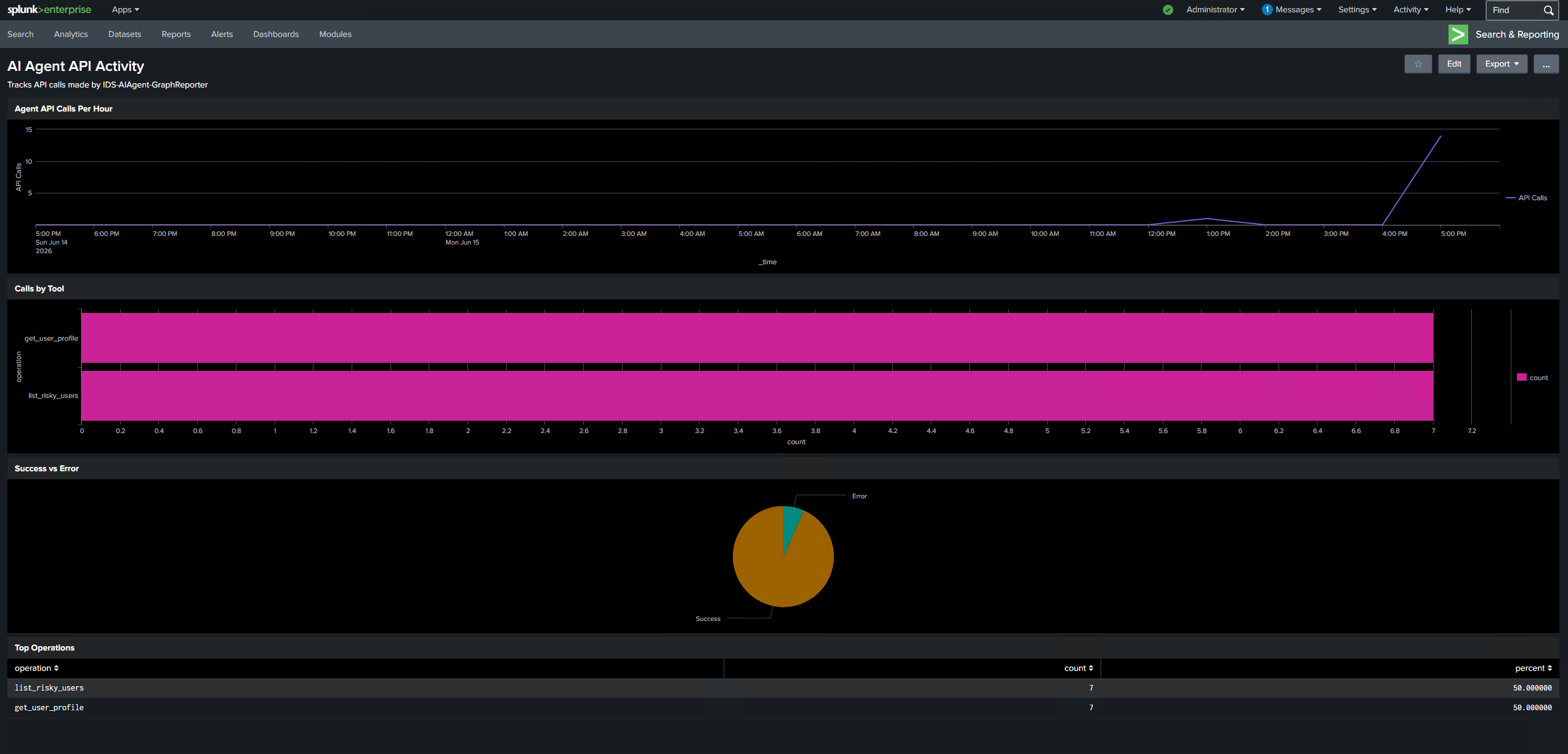
Log every agent API call to Splunk HEC with timestamp, app_id, operation, Graph endpoint, HTTP status, and response time. Forward Entra service principal sign-in logs as a second audit source. Build "AI Agent API Activity" dashboard.
Decommission Validation
Exercise the full decommission sequence: revoke client secret, confirm 401 on token acquisition, disable app registration, confirm final failed auth event in Entra sign-in log. Registration disabled rather than deleted to preserve audit trail.
Permission justification: User.Read.All (user profile attributes), Group.Read.All (group membership queries), IdentityRiskyUser.Read.All (risky user surface for reporting), AuditLog.Read.All (sign-in log anomaly summary). Permissions explicitly denied: Directory.ReadWrite.All, User.ReadWrite.All, RoleManagement.ReadWrite.Directory, Mail.*, Files.* — each documented with denial rationale at registration.
Implementation
Phase 1 — App Registration and Permission Scoping
-
01
Create the App Registration
App registration
IDS-AIAgent-GraphReportercreated in Entra ID. Application permissions selected — not delegated — to reflect that no human user context exists during agent execution. Admin consent granted for four scoped permissions only.Register-AgentAppRegistration.ps1automates registration, permission assignment, and admin consent grant via Microsoft.Graph PowerShell.// 01-app-registration-overview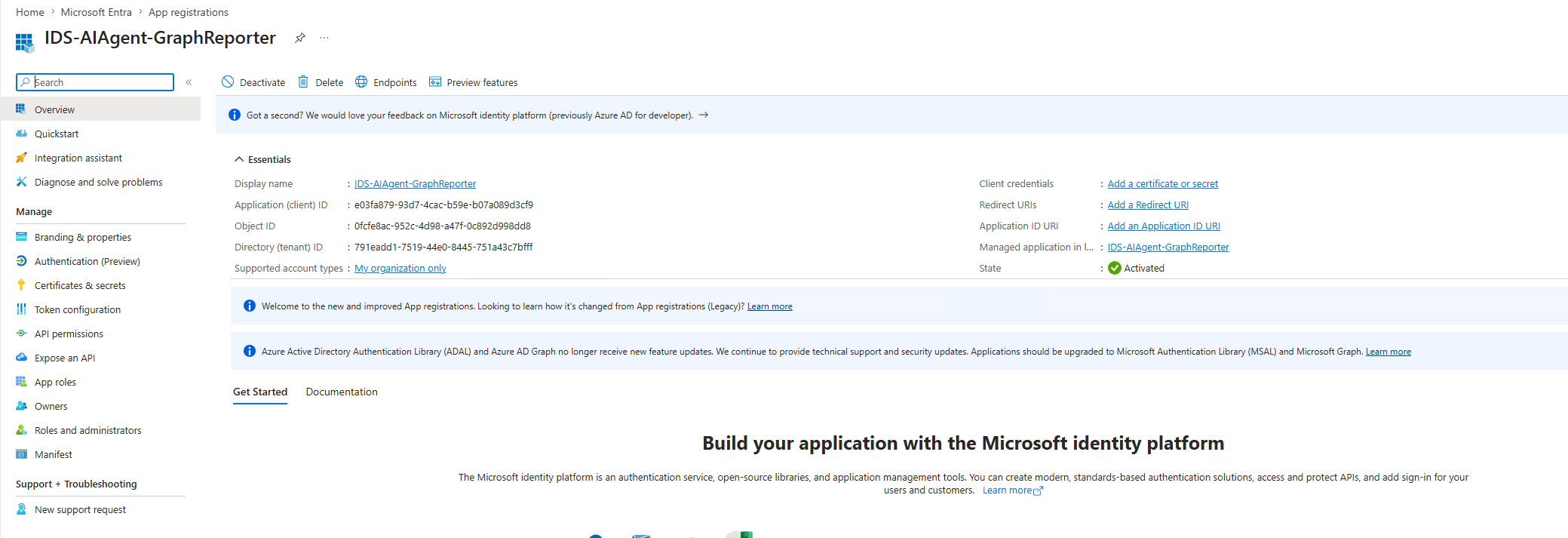
-
02
Configure API Permissions
Four application permissions granted with admin consent, each documented with a business justification. Permissions panel screenshot captured as SOC 2 CC6.1 evidence confirming least-privilege configuration at time of deployment.
// 02-api-permissions-granted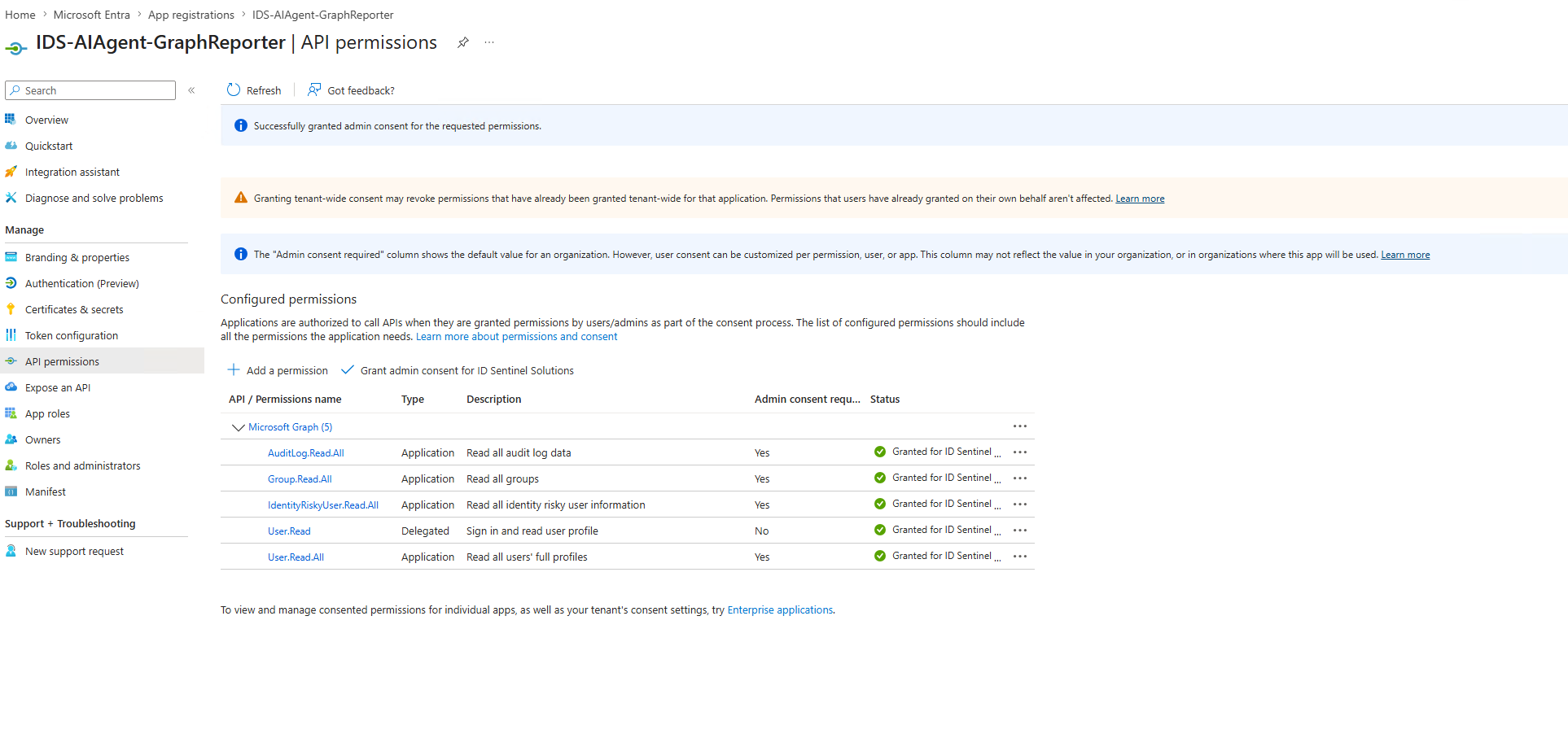
-
03
Generate Client Secret
Client secret generated with 90-day expiration. Recorded in Bitwarden with owner, creation date, expiration date, and scenario reference (SCN-15). Secret was never stored in code or environment variables.
// 03-client-secret-created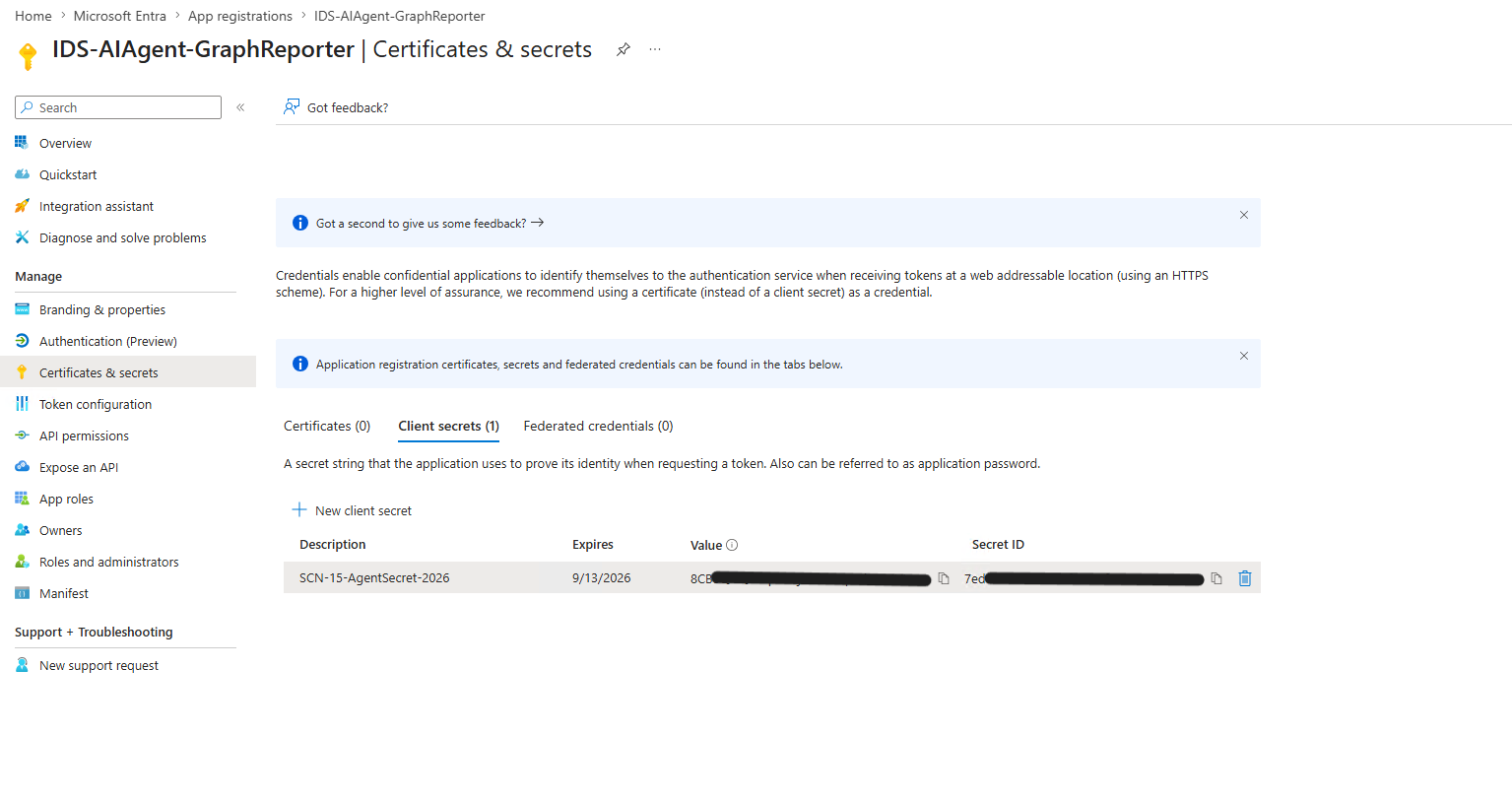
Phase 2 — OAuth2 Token Acquisition and JWT Validation
-
04
Acquire Token and Validate JWT Claims
agent_token.pyacquires a token via the client credentials flow targetinghttps://graph.microsoft.com/.default. Break/fix: initial token acquisition returned 401 on Graph API calls because the/.defaultsuffix was omitted from the resource URI. Corrected and re-acquired — 200 on all subsequent calls. JWT decoded to confirmappid,roles(four permissions only), andtidclaims.// 07-token-401-breakfix // 04-token-acquisition-response
 // 05-jwt-decoded-claims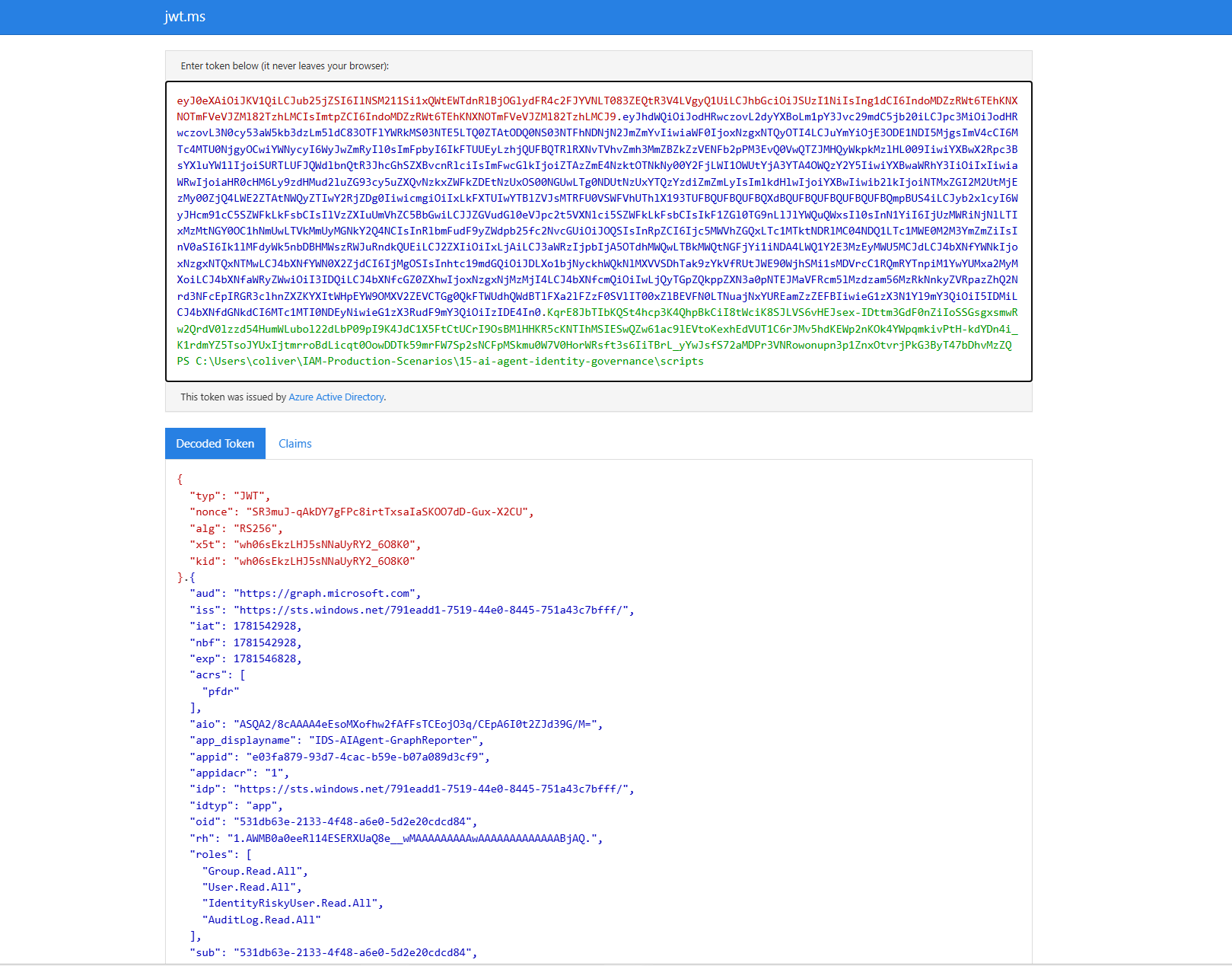
Phase 3 — Agent Tool Implementation
-
05
Governed Tool Functions and LLM Tool Selection
Three tool functions in
agent_tools.py, each making a single targeted Graph API call via the governed bearer token:get_user_profile,get_group_members,list_risky_users.agent_runner.pypasses a natural language prompt and tool definitions to the Anthropic API — model returns a structured tool selection, agent executes with the governed token. Token not held in memory beyond the function call; re-acquired on expiration via token cache.// 06-graph-api-response-scoped // 08-agent-tool-selection
 // 09-agent-graph-response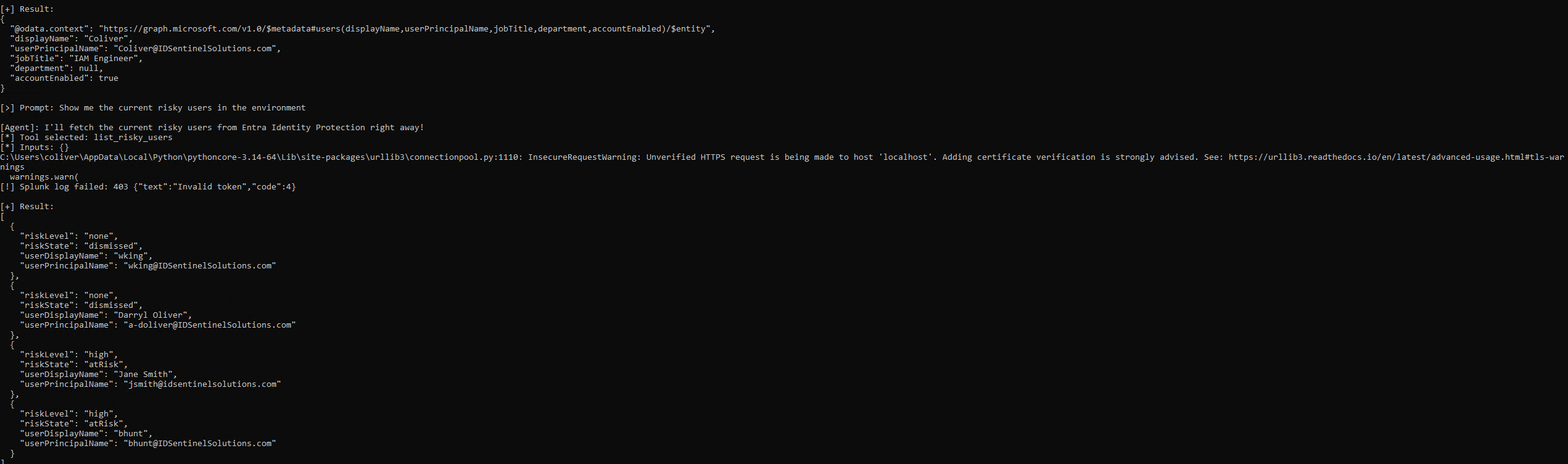
Phase 4 — Splunk Audit Pipeline
-
06
HEC Ingest and AI Agent API Activity Dashboard
Agent API calls logged to Splunk HEC — each event includes timestamp,
app_id, operation (tool name), Graph endpoint, HTTP status, and response time. Entra service principal sign-in logs forwarded as a second audit source, showing the sameapp_idperforming token acquisitions with correlated timestamps. Dashboard deployed with panels for calls per hour, operations by tool, error rate, and top endpoints.// 10-splunk-hec-ingest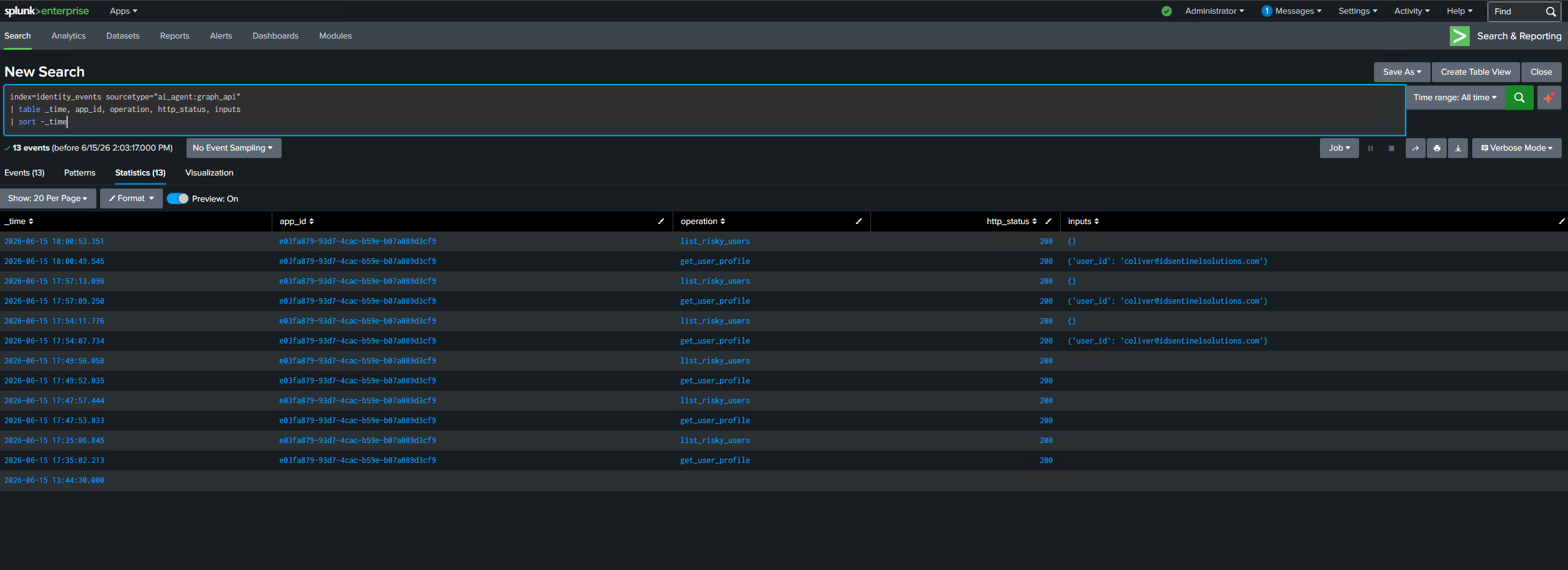 // 11-splunk-dashboard-activity
 // 12-entra-signin-log-agent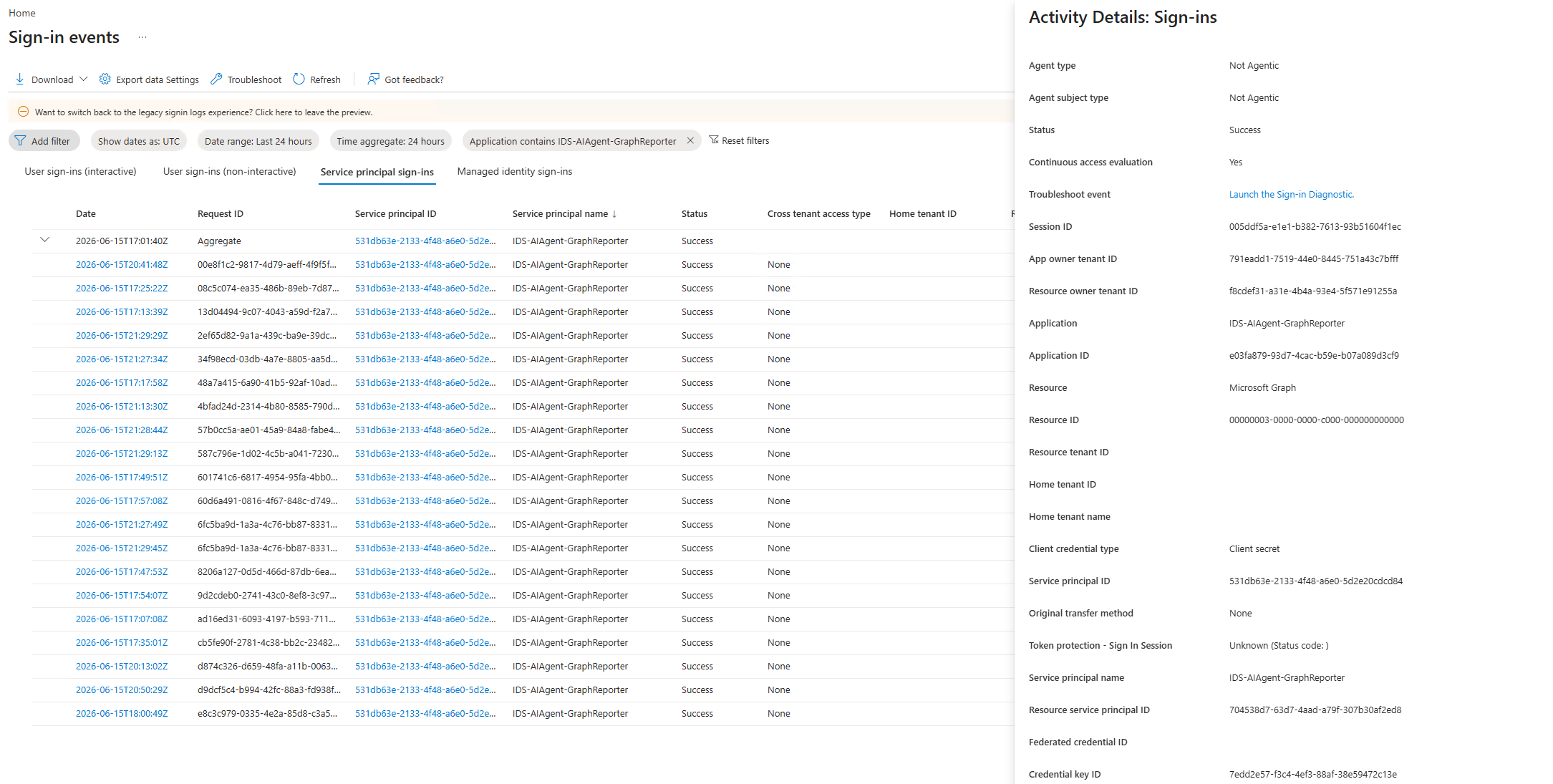
Phase 5 — Decommission Validation
-
07
Full Decommission Sequence
Invoke-AgentDecommission.ps1executed to validate the complete decommission path. Four steps validated in sequence:- Step 1 — Revoke client secret: Deleted from Certificates & Secrets panel. Panel confirmed empty after deletion
- Step 2 — Confirm 401:
agent_token.pyreturned401 invalid_clientimmediately. No cached token survived beyond expiration window - Step 3 — Disable app registration: Status set to Disabled — token issuance blocked. Registration retained (not deleted) to preserve audit trail
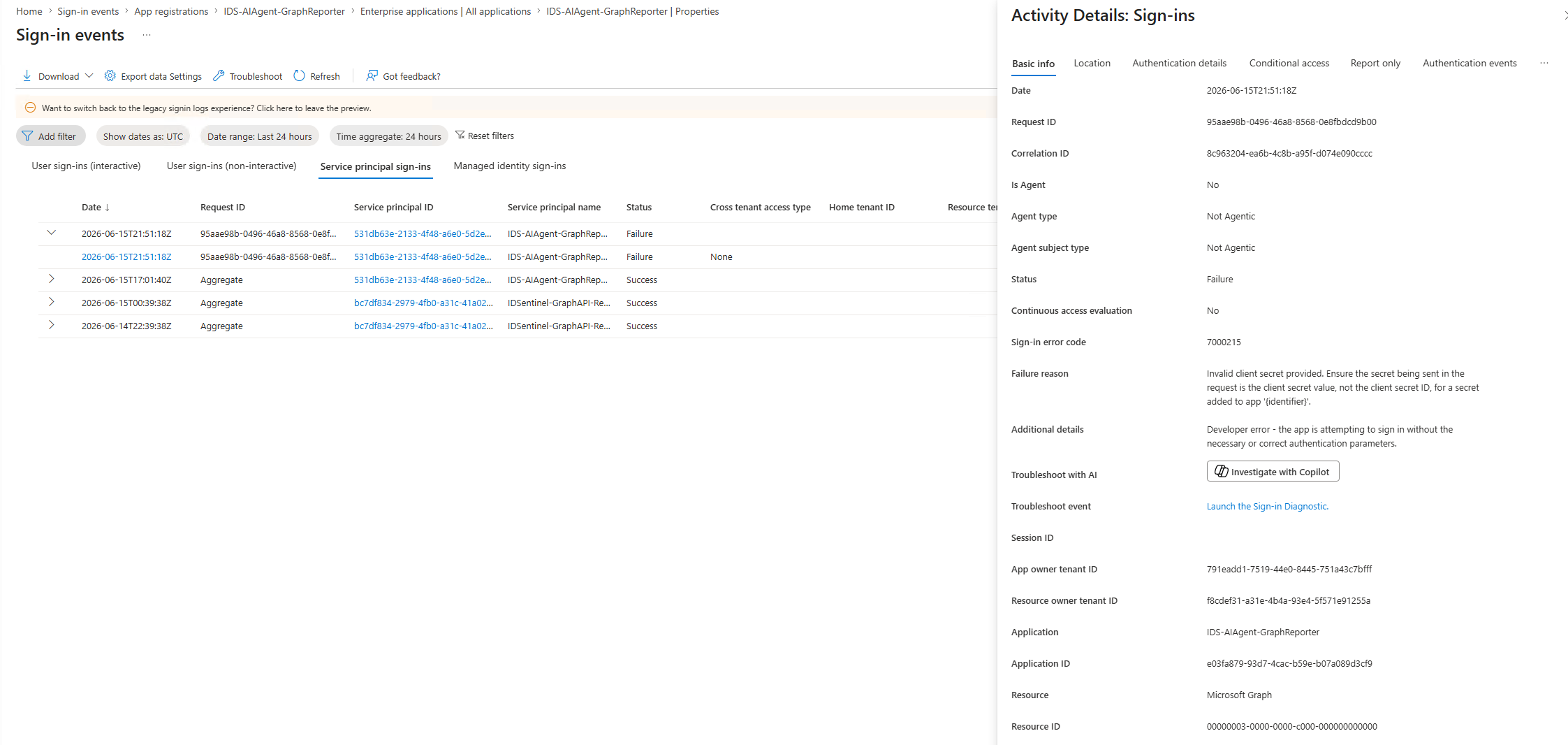
- Step 4 — Confirm sign-in log: Final failed auth event confirmed in Entra service principal sign-in log with error code
invalid_clientand timestamp
// 13-secret-revocation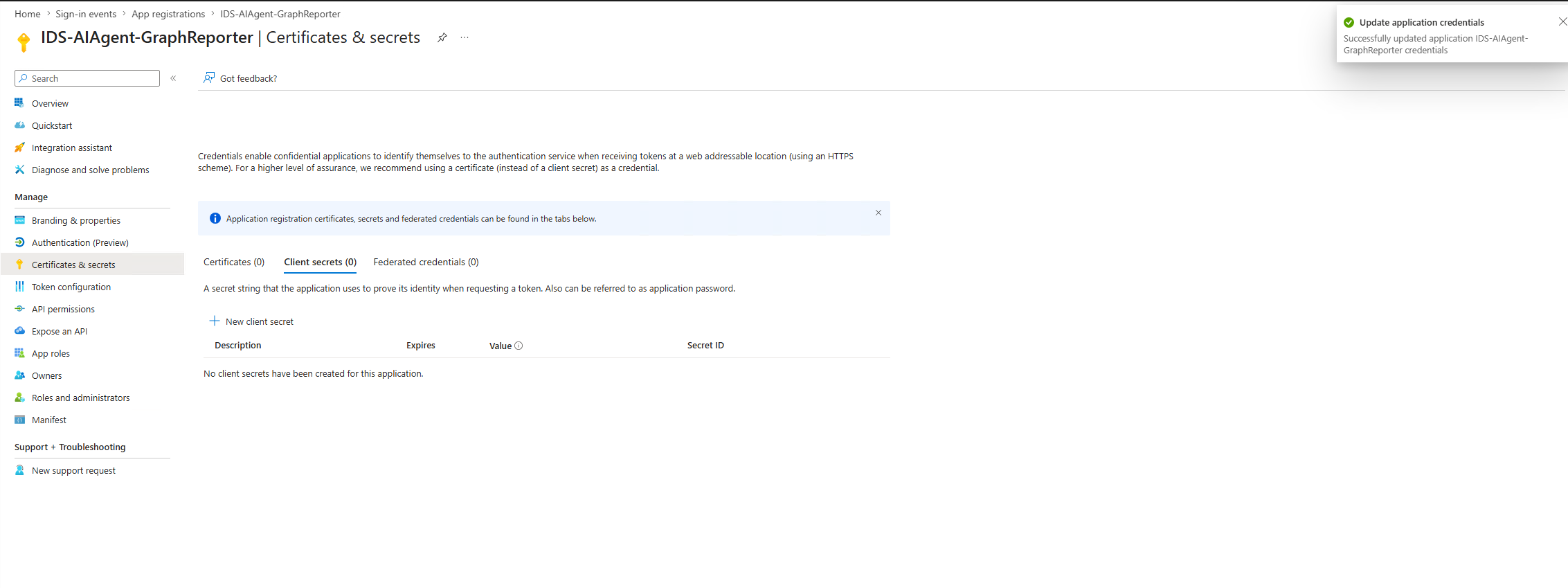 // 14-post-revocation-401
 // 15-entra-signin-failure-detail
 // 16-app-registration-deactivated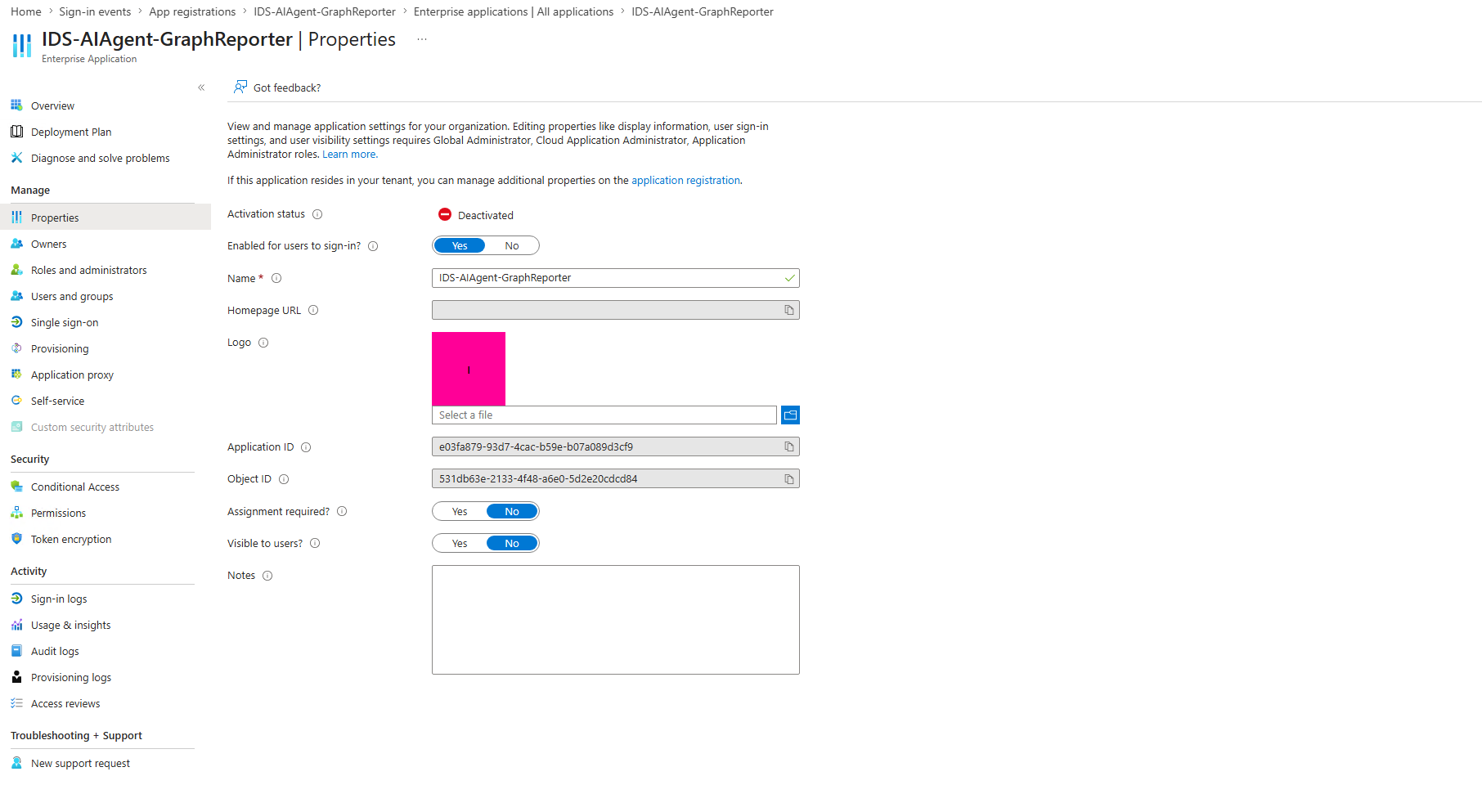
Outcome
roles array contains only the four granted permissions — no scope creepImplementation Results
| Metric | Value |
|---|---|
| App registrations created | 1 (IDS-AIAgent-GraphReporter) |
| Application permissions granted | 4 (User.Read.All, Group.Read.All, IdentityRiskyUser.Read.All, AuditLog.Read.All) |
| Permissions explicitly denied | All write, mail, files, and role management permissions |
| OAuth2 flow | Client credentials — application identity, no delegated user context |
| Token lifetime | 3,600 seconds; re-acquired on expiration via token cache |
| Client secret rotation | 90-day expiration; tracked in Bitwarden |
| Agent tools implemented | 3 (get_user_profile, get_group_members, list_risky_users) |
| Splunk log sources | 2 (HEC agent events + Entra service principal sign-in logs) |
| Decommission steps validated | 4 (revoke secret, confirm 401, disable registration, confirm sign-in log) |
| Long-lived admin credentials used | 0 |
SOC 2 Compliance Mapping
| Control | Requirement | Evidence |
|---|---|---|
| CC6.1 — Logical Access Controls | Access to org data requires logical access controls | App registration with four scoped permissions; admin consent; no admin credential in execution path |
| CC6.3 — Access Removal | Access removed when no longer required | Decommission sequence: secret revocation, 401 confirmation, disabled registration, sign-in log final auth event |
| CC6.6 — Logical Access Boundaries | Logical boundaries enforced at platform layer | JWT decoded claims confirming roles scoped to four permissions; no delegated context; no user escalation path |
| CC6.8 — Unauthorized Access Prevention | Prevent unauthorized access to org resources | 401 on revoked secret confirmed by Splunk HEC log and Entra sign-in log; no residual standing access |
Non-Human Identity Notes
- Application vs. delegated permissions for agentic workloads: An AI agent operating without a logged-in user must use application permissions, not delegated. Delegated permissions inherit the user's access context, which introduces privilege escalation risk if the agent is invoked by a high-privilege user. Application permissions enforce a fixed, documented scope regardless of who invokes the agent.
- Decommission path is not optional: Static service accounts are often decommissioned when someone notices they are no longer used. AI agents can persist in an active state indefinitely without a defined retirement trigger. The decommission runbook and validated 401 confirmation are the control that closes this gap.
Files
-
scripts/Register-AgentAppRegistration.ps1Creates Entra app registration and configures API permissions via Microsoft.Graph PowerShell -
scripts/agent_token.pyClient credentials flow, token cache, and re-acquisition on expiry -
scripts/agent_tools.pyTool implementations — get_user_profile, get_group_members, list_risky_users -
scripts/agent_runner.pyLLM agent runner — prompt to tool selection to governed Graph API execution to Splunk HEC log -
scripts/Invoke-AgentDecommission.ps1Decommission runbook — revokes secret, disables registration, confirms 401 -
scripts/agent-audit.splSplunk SPL queries for AI Agent API Activity dashboard -
evidence/soc2-control-mapping.mdSOC 2 CC6.1, CC6.3, CC6.6, CC6.8 evidence mapping -
runbooks/agent-decommission-runbook.mdStep-by-step decommission procedure with validation checkpoints -
screenshots/Implementation evidence organized by phase